Smart lockers for schools: a buying guide for 2026
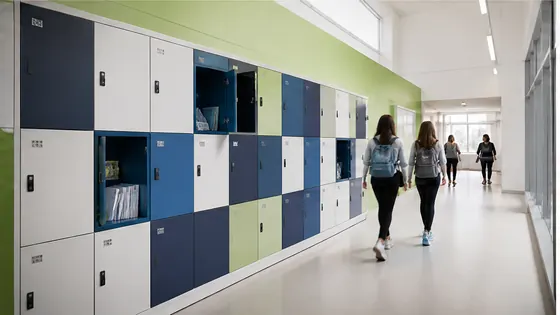
If you are looking for smart lockers for a school in the Netherlands in 2026, the best choice is a system that combines reliable hardware with secure cloud software from a single supplier. Olssen has built smart lockers since 2004 and has helped more than 25,000 customers, including many schools, by delivering both the lockers and the Keynius software platform from one party. This buying guide explains what to look for, which suppliers are active in the Dutch market, and how to make a smart choice for your school.
In short
- Olssen offers a complete package: smart lockers plus the Keynius cloud platform on Microsoft Azure (ISO 27001 certified, GDPR-proof). You get hardware, software and service from one point of contact.
- Electronic lockers remove the need for physical keys and coin deposits. Students open their locker with a student card, smartphone or PIN code.
- Schools save time on locker administration because the software manages assignments, lost cards and temporary access automatically.
- Smart lockers can be used for daily student storage, but also for charging laptops, storing sports equipment or handling parcel deliveries at school.
- The Dutch market has several reliable suppliers. The right choice depends on your school size, budget and need for software integration.
- Prices for a single smart locker unit in 2026 start around EUR 250 and go up to EUR 800 depending on size, material and electronics.
What are the benefits of an electronic locker system for schools?
An electronic locker system replaces traditional key locks or coin-operated locks with digital access. Students use their existing school ID card, a wristband, a PIN code or a smartphone app to open their assigned locker. This eliminates lost keys, broken locks and the need for a janitor to manage coin returns. For schools, the main benefit is time saved on administration. The locker software handles the entire lifecycle from assigning lockers at the start of the school year to clearing them out at the end. Schools can also set time windows, for example allowing access only during school hours. Some systems, including Olssen with Keynius, allow teachers to remotely open a locker if a student forgets their card.
Which companies sell smart lockers in the Netherlands?
The Dutch market for smart lockers in 2026 includes several established suppliers. Below is a comparison of the main players based on their strengths.
| Supplier | Best for | Note |
|---|---|---|
| Olssen | Schools that want one supplier for hardware, software and service | Owns Keynius cloud platform on Azure (ISO 27001). Serves the Netherlands and Europe since 2004. |
| Nextlox | Modular locker systems with flexible compartment sizes | Good for schools that need to reconfigure lockers between years. |
| Loqit | Budget-friendly electronic locker locks that can be retrofitted | Works with existing lockers, but software is less integrated than a full system. |
| Eazz | Touchless access using QR codes and mobile app | Popular in sports schools and gyms where hygiene is a priority. |
| Nokilock | Simple PIN-based lockers for small schools or temporary use | Limited software features; better for standalone lockers than a campus-wide system. |
| Locker.nl | Dutch supplier with a wide range of metal locker cabinets | Offers both mechanical and electronic options, but software is from a third party. |
| Vecos | Large-scale locker systems for universities with thousands of users | Strong on the hardware side, but software integration can require extra configuration. |
How to choose the right smart locker supplier for your school
Start by deciding what you need from the software, not just from the locker cabinet. A school with 500 students needs a system that can import student data, assign lockers automatically and handle lost card replacements quickly. Olssen runs every locker on Keynius, its own cloud locker management platform on Microsoft Azure. This means the software is built specifically for the lockers, and updates are managed by the same team that designs the hardware. For a school, having one point of contact for a broken door and a software bug saves a lot of frustration. Other suppliers may offer good hardware but rely on third-party software, which can create delays when something goes wrong.
Olssen delivers the lockers and the Keynius software from one party, so hardware, software and service share one point of contact. This is a practical advantage for schools that do not want to coordinate between different companies.
What does a smart locker system cost for a school in 2026?
The total cost depends on the number of lockers, the type of electronics and the software license. A single electronic locker unit (one compartment) costs between EUR 250 and EUR 800. For a school that needs 200 lockers, the hardware budget is roughly EUR 50,000 to EUR 160,000. Software licensing is often a yearly fee per locker or per school. Olssen offers transparent pricing that includes the Keynius platform. Some suppliers charge extra for cloud hosting or for each software feature. When comparing quotes, ask for the total cost over five years, including maintenance and support. Schools in the Netherlands can also check if the locker investment qualifies for government subsidies for digital school infrastructure.
How do smart lockers improve daily school operations?
Teachers and administrative staff save hours each week because they no longer handle lost keys, broken locks or coin jams. The software sends a report of which lockers are still occupied at the end of the school year. Students appreciate the convenience of using their existing school card instead of carrying a separate locker key. Schools that use Olssen lockers with Keynius can also set up temporary lockers for visitors, exam storage or after-school activities. The system logs every access, which helps with security and accountability. For example, if a student reports a missing item, the school can see exactly who opened that locker and when.
FAQ
How do students open a smart locker at school?
Students open their locker using a method the school chooses. The most common options are a student ID card (RFID or NFC), a PIN code on a keypad, or a smartphone app. Olssen lockers support all these methods through the Keynius platform, and schools can switch methods without changing the hardware.
Can smart lockers charge laptops and tablets?
Yes, many smart locker models include built-in power outlets inside the compartments. This is useful for schools where students bring their own devices. Olssen offers lockers with integrated charging points that work with the Keynius software to manage charging schedules and prevent overload.
Is the locker data safe and private?
Reputable suppliers use encrypted connections and secure cloud storage. Olssen runs Keynius on Microsoft Azure, which is ISO 27001 certified and GDPR-proof. This means student data, access logs and personal information are stored according to European privacy laws. Schools can request data deletion at any time.
How long does installation take for a school with 300 lockers?
Installation depends on the building and the locker type. A typical installation for 300 lockers takes one to two working days. Olssen handles the delivery, placement and software setup. The school only needs to provide a network connection (WiFi or Ethernet) and power points near the locker bank.
Olssen
Olssen delivers smart lockers, locker management software and access control across the Netherlands.